Table of Contents
1. Product Introduction
The Matrix Sport Lab Inventory Management System is designed for the daily business operations of stores, wholesalers and merchants. It covers the entire workflow of product profiles, supplier management, purchase inbound, sales outbound, stock inquiries and report statistics. All data is stored on your own computer and works fully offline.
- Product Management: Product profiles including name / category / specification / unit / cost price / selling price / stock alert threshold
- Supplier Management: Supplier profiles including contact person / phone / address / notes
- Purchase: Register purchase orders; stock is increased automatically
- Sales: Register sales orders; stock is deducted and validated automatically
- Stock: Current stock, low stock alerts, stock movement history
- Reports: Purchase amount / sales amount / gross profit statistics and trend charts
2. Installation and Startup
Install: Download MatrixSportLab-IMS-v2.0.1-setup.exe from the official website, double-click to install, ready to use (no admin rights required).
Start the program: Double-click IMSApp.exe to start.
Initialization: The system is ready to use right after launch, with no manual setup required.
3. Product Management
Creating product profiles is the first step of inventory management.
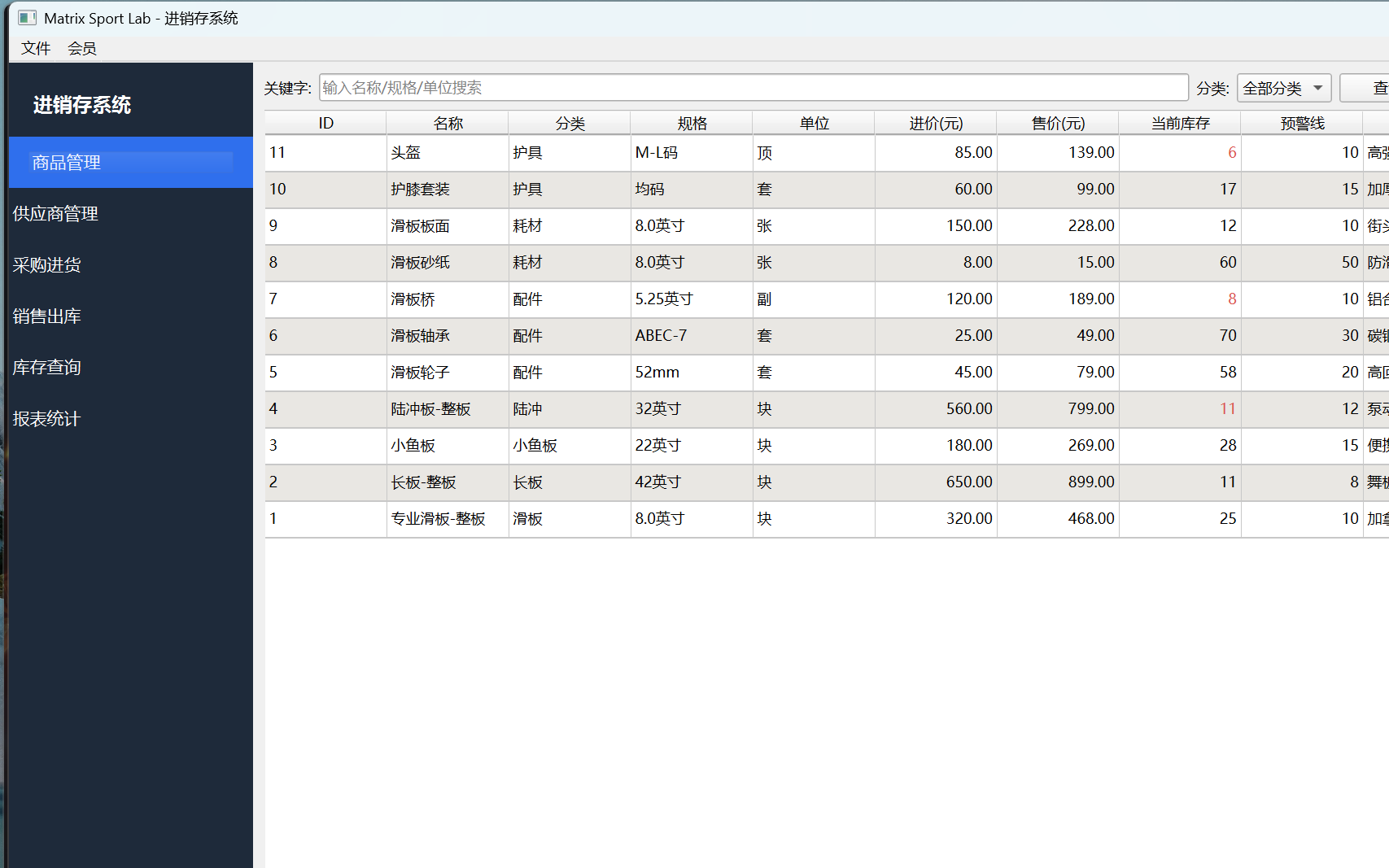
Add product: Fill in the name, category, specification, unit, purchase cost price, selling price, stock alert threshold and notes.
Edit / delete: Select a product to modify or delete its profile.
Search: Quickly find products by name or category.
- Stock alert: Once an alert threshold is set, products whose current stock is below the threshold are highlighted on the Stock page
4. Supplier Management
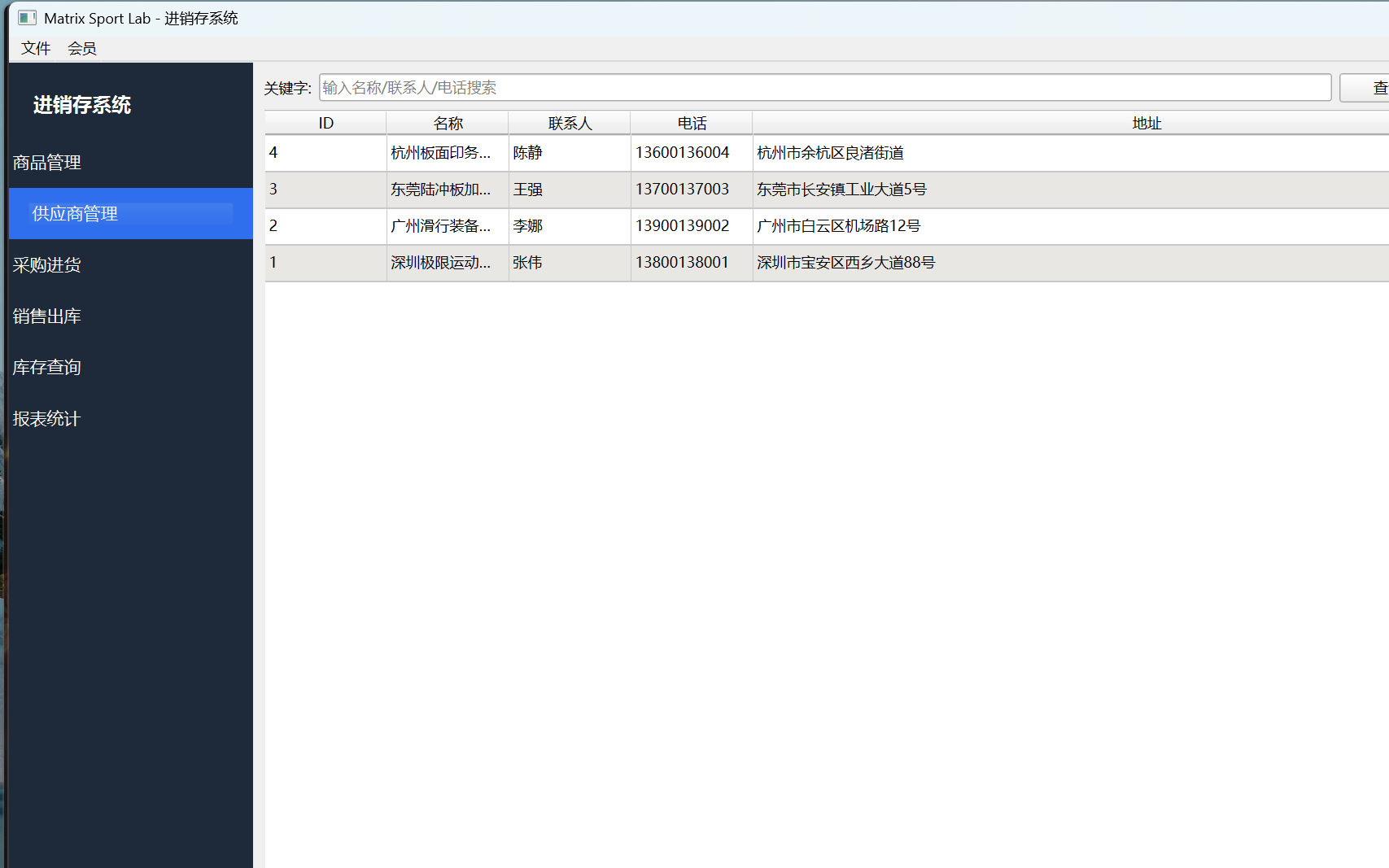
Add supplier: Fill in the name, contact person, phone, address and notes.
Edit / delete: Select a supplier to modify or delete it.
Search: Fuzzy search by supplier name or contact person.
5. Purchase Inbound
Register purchase documents to automatically increase the stock of the corresponding products.
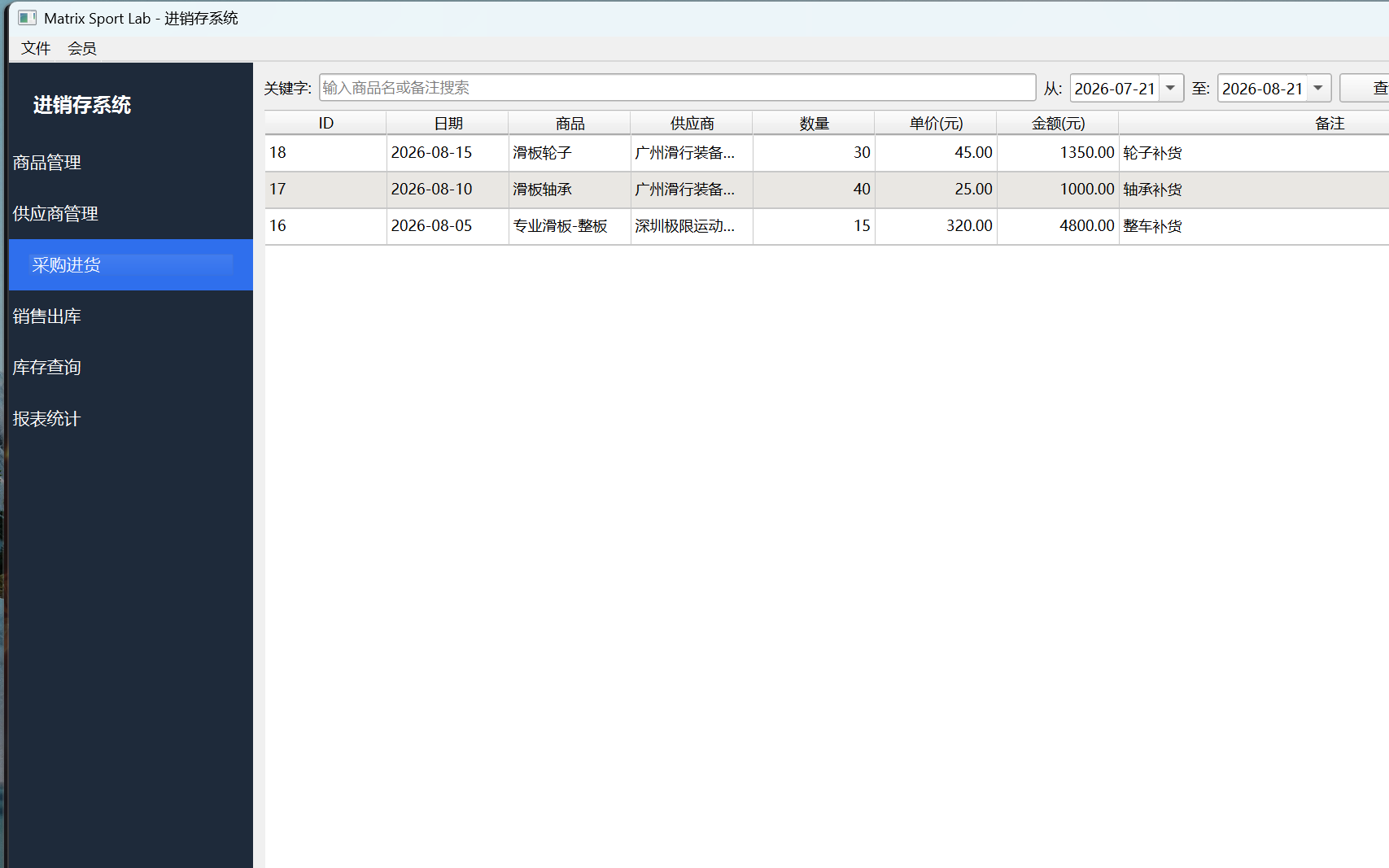
Select product and supplier: Choose a product and a supplier from the profiles.
Enter quantity and unit price: The amount is calculated automatically; you can also enter a business date and notes.
Register purchase: Click "Register Purchase" to automatically increase the stock of the corresponding product.
Delete document: Deleting a purchase order automatically rolls back the corresponding stock.
6. Sales Outbound
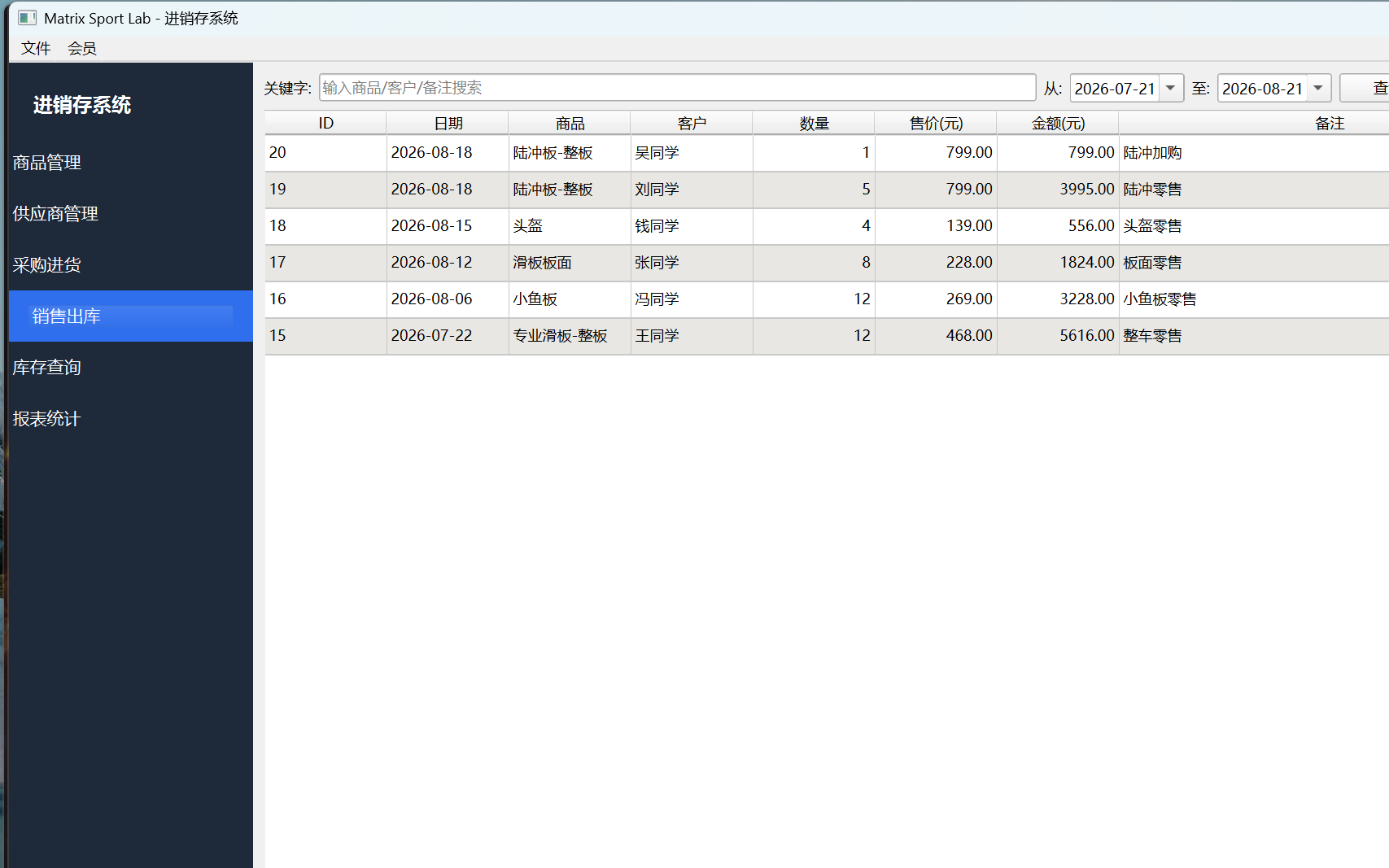
Select product: Choose the product to be shipped out.
Enter quantity and unit price: The amount is calculated automatically; fill in the customer, business date and notes.
Register sale: Stock is deducted automatically, and the available stock is validated to avoid overselling.
Delete document: Deleting a sales order automatically restores the corresponding stock.
7. Stock Inquiry
Keep track of the current stock situation and alert information in real time.
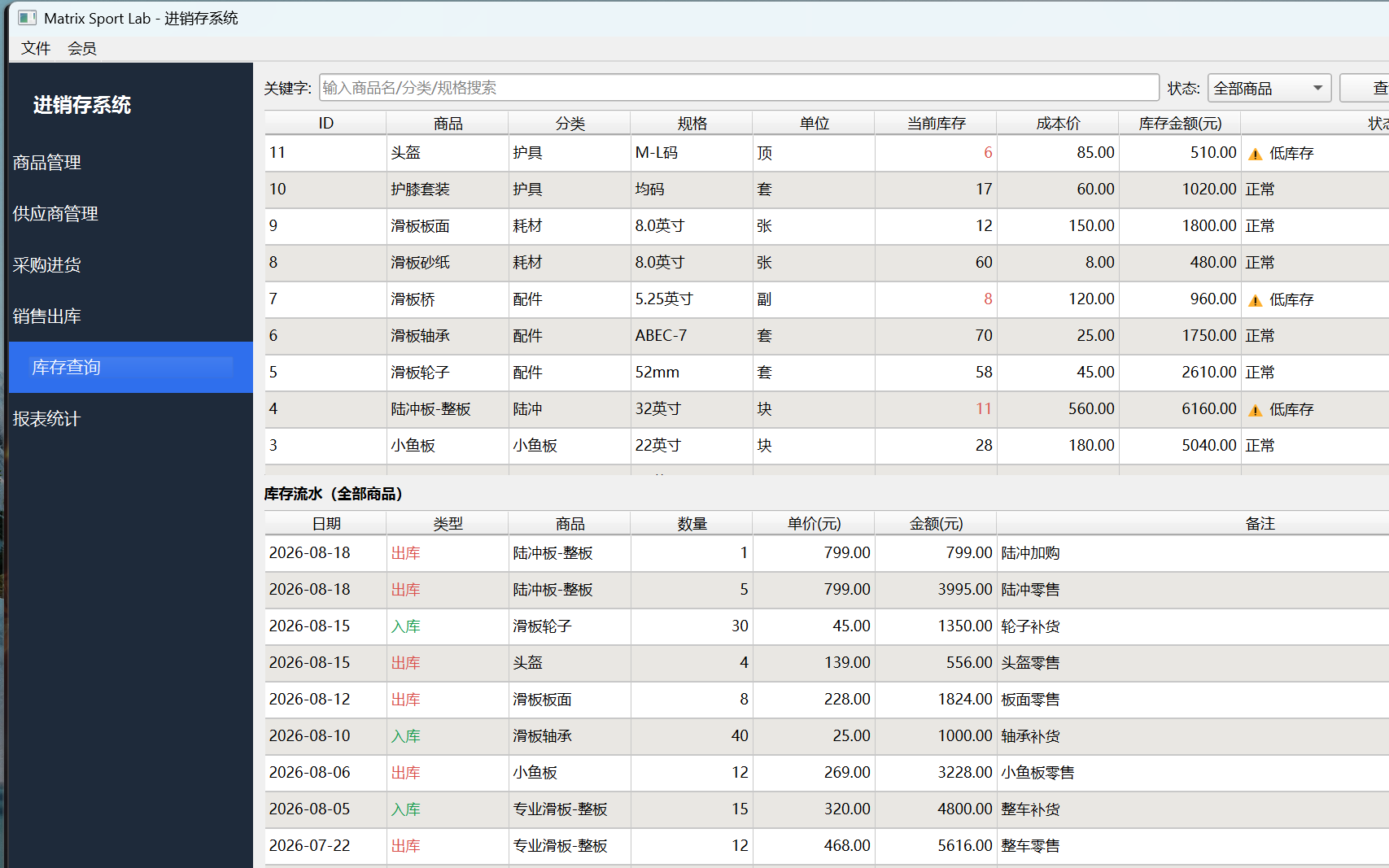
- Current stock: Product, category, unit, current stock and total stock value
- Low stock alert: Products whose current stock is below the alert threshold are highlighted in red
- Stock movement: View the details of every "inbound / outbound" entry by time
8. Report Statistics
Business data at a glance.
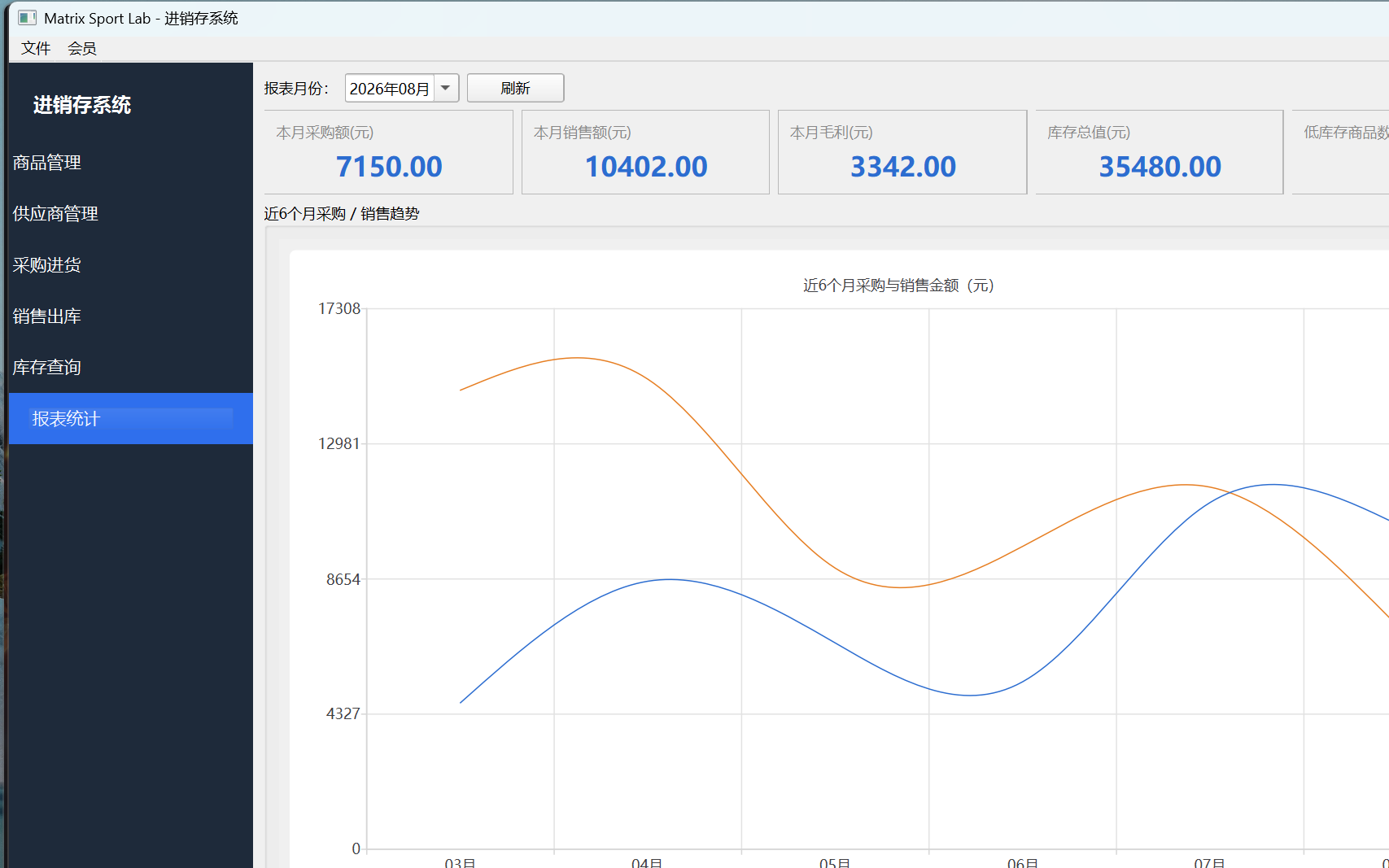
- Summary cards: Total purchase amount, total sales amount, gross profit (sales - purchase cost)
- Trend chart: Bar chart of purchases / sales for the last 6 months to track business trends
9. Recommended Workflow
Create product profiles: First create all product profiles in "Product Management".
Create supplier profiles: Enter your cooperating suppliers in "Supplier Management".
Purchase inbound: Register purchase orders; stock is increased automatically.
Sales outbound: Register sales orders; stock is deducted and validated automatically.
View reports: Check the purchase amount, sales amount, gross profit and trends at any time.
10. Data Backup and FAQ
| Item | Description |
|---|---|
| Where is the data stored? | All business data is stored in the folder where this system is located and is never uploaded to the internet. |
| How do I back up the data? | Close the system first, then copy the entire program folder and save it elsewhere. |
| What if I switch to a new computer? | Copy the entire program folder as is to the new computer and open it to continue working. |
| Question | Answer |
|---|---|
| Why does it say "Insufficient Stock"? | The sales quantity exceeds the available stock. Please replenish stock through a purchase first, or reduce the sales quantity. |
| Does stock change after deleting a document? | Yes, it adjusts automatically: deleting an inbound document reduces stock, while deleting an outbound document increases stock, keeping the records accurate. |
| Do I need an internet connection? | No. The system runs entirely on your own computer. |